
Do Ad Blockers Break Affiliate Tracking?
Ad blockers break affiliate tracking when they block the third-party script or pixel that records a sale, not the affiliate link itself. Around 27% of US internet users run one, so a slice of your affiliate sales never reaches your reports. Server-side postbacks and first-party domain tracking close most of that gap.
 An affiliate promotes your offer, sends real buyers, and then opens a dashboard showing fewer sales than she drove. She assumes you’re shorting her. You assume she’s exaggerating. Neither of you is lying. An ad blocker quietly ate the tracking event on some of those orders, and the sale landed in your order system with no affiliate attached to it.
This is a narrow, mechanical problem with a mechanical fix. I’ll show you what ad blockers intercept, why that turns real sales into invisible ones, and the two changes that recover most of the lost data. If you also want the wider picture of how clicks turn into commissions, How Affiliate Tracking Works covers the full chain.
Around 27% of US internet users run an ad blocker
Roughly 27% of US internet users run an ad blocker, and worldwide the figure sits closer to a third of all users. That share climbs higher among younger, more technical audiences and among people who found your offer through paid ads, because ad blockers are more common in exactly those groups.
The popular tools are uBlock Origin, AdBlock Plus, and Ghostery, plus the Brave browser, which blocks ads and trackers by default with nothing installed. Privacy Badger, made by the Electronic Frontier Foundation, learns and blocks trackers on its own as you browse.
So if a quarter of your traffic runs one of these tools, a quarter of your affiliate clicks are moving through a browser that’s actively trying to stop tracking. Not all of those clicks lose their attribution. But enough do to matter, and the higher your paid-traffic mix, the worse it gets.
Ad blockers match requests against filter lists like EasyList and EasyPrivacy
 Ad blockers work by matching every network request your browser makes against filter lists, then blocking any request that matches a rule. EasyList is the community-maintained list that targets ad content. EasyPrivacy is the companion list that targets tracking scripts and known analytics and attribution domains.
When your page loads, the browser tries to fetch dozens of resources: images, scripts, pixels. The ad blocker checks each request’s domain and path against thousands of filter rules before it fires. A request to a domain on EasyPrivacy gets killed before it ever reaches the server. The rest of your page loads fine.
The rule is the domain, not the intent. Affiliate tracking pixels and conversion scripts often live on the same shared tracking domains that also serve ad networks. When a filter list adds that domain, every request to it dies, including the legitimate affiliate conversion event you need to pay a partner.
Ad blockers block the tracking script, not the affiliate link
Ad blockers rarely touch the affiliate link itself, because the click-through is a normal redirect your visitor chose to follow. Someone clicks a partner’s link, the redirect passes through your platform, sets attribution, and lands them on your product page. That first hop usually survives.
The part that dies is the conversion tracking that fires later, on your thank-you page, after the purchase. That’s a client-side script or a tracking pixel loaded from a domain the ad blocker recognizes. The click gets recorded. The sale that should close the loop does not.
This is the split most program managers miss. Your click counts can look healthy while your conversion counts run short, because the two events use different delivery methods and ad blockers hit them differently. Affiliate Attribution Models Explained gets into how that final credit gets assigned once the pixel does fire.
A blocked conversion pixel is one of a handful of reasons your numbers stop adding up, alongside cross-device buyers and self-referred orders. How Affiliate Tracking Works walks through each failure point and how to tell them apart before an affiliate accuses you of cheating.
Blocked pixels erase affiliate sales from your reports
 A blocked conversion pixel produces a sale in your order system with no affiliate credited, which shows up as a discrepancy between your revenue and your affiliate platform’s reported revenue. The money is real. The attribution is gone. Nobody gets paid for a sale they earned.
A 10 to 20% gap between your order system and your affiliate platform is common and mostly harmless, since some of it comes from direct buyers and analytics quirks. A gap wider than that, especially on paid-traffic promotions, points at blocked tracking eating attribution you should be recording.
The damage compounds past the missed payout. An affiliate who drives 40 sales and sees 30 in her dashboard concludes your program steals from partners. She won’t send you an angry email. She’ll pull your offer from her next promotion and warn two friends. I’ve watched a tracking gap cost a client three partners who each would have produced six figures the following year.
If you want to separate honest tracking loss from actual bad actors gaming your numbers, Affiliate Fraud Prevention Tools covers the difference. Undercounting and overcounting are separate problems with separate fixes.
Server-side postback tracking records sales without the browser
Server-side postback tracking records a sale by sending the conversion straight from your server to your affiliate platform, so no browser and no ad blocker ever sit in the path. When a transaction completes, your server posts the order data server-to-server. There’s no script for a filter list to block.
This is the single most effective fix for ad-blocker loss, because it removes the browser from the recording step entirely. A postback (sometimes called a server-to-server or S2S callback) fires from code you control, using a click ID captured at the moment of the click, then matched to the order at checkout.
The tradeoff is setup work. Somebody has to wire the conversion event into your order processing or billing code, which usually means a developer touches your checkout once. For a program running heavy paid traffic or seeing consistent wide discrepancies, that hour of dev time pays for itself fast. How To Track Affiliate Performance covers which numbers to watch to decide whether you’ve crossed that threshold.
Tracking is one piece of a much larger build, and getting it wrong early costs you trust you can’t buy back. The Book on Affiliate Management is 300+ pages on the system I used to build a $1 million per month affiliate program in under two years, from recruiting through payouts.
First-party domain tracking hides your tracking from filter lists
 First-party domain tracking routes your tracking through a subdomain of your own site, so requests go to a domain that filter lists like EasyPrivacy don’t recognize as a tracker. Instead of loading a pixel from a shared tracking domain flagged on EasyPrivacy, the browser loads it from something like go.yourbrand.com, set up with a CNAME record.
The mechanism is simple. Filter lists block by domain. A request to a well-known third-party tracking domain matches a rule. A request to your own subdomain does not, because no filter list has your custom domain on it. The tracking event survives the ad blocker because, from the browser’s view, it’s a first-party request to the site the visitor is already on.
First-party domain tracking and server-side postbacks solve the problem from two angles, and strong setups use both. The postback removes the browser from the sale-recording step. The first-party domain protects the browser-side events that remain, like the initial click log. Together they recover most attribution that a script-only setup on a shared domain loses.
Dedicated affiliate software with first-party tracking beats a script-only setup
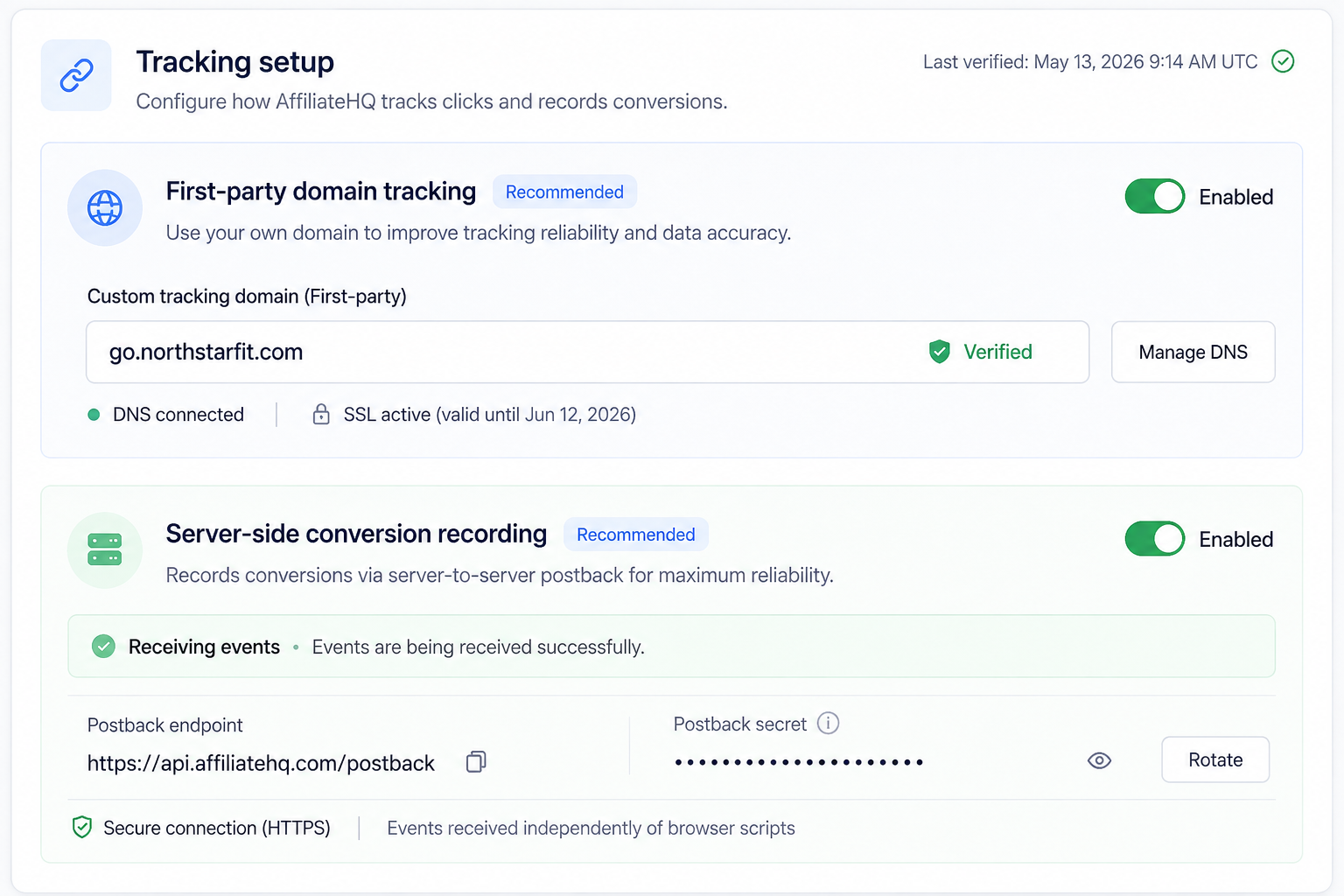 Dedicated affiliate software with first-party tracking and server-side postbacks built in recovers attribution that a generic script-and-pixel setup loses to ad blockers, without asking your program manager to configure CNAMEs or write postback code by hand. The tracking method is the product’s job, not a project you assemble.
I’ve run affiliate programs for more than 20 years and won four Affiliate Manager of the Year awards, and every off-the-shelf platform I tried let me down on exactly this kind of detail. Whoever built the software had never run a program for a living. So I built AffiliateHQ, and yes, I own it, which is why I’ll tell you plainly where it fits and where it doesn’t.
AffiliateHQ uses first-party tracking and server-side recording so ad blockers and browser privacy tools have far less to intercept, and it maps to what I teach in The Book on Affiliate Management. If you’re comparing options, Best Affiliate Program Software and 14 Questions To Ask Before You Buy Affiliate Software lay out the criteria that matter, and how tracking is handled belongs near the top of that list.
Blocked tracking is one of the quiet ways an affiliate program bleeds money you never see. Top 20 Affiliate Program Mistakes is a free report on the errors that nearly wrecked my program, including the tracking gaps that make partners walk, plus how to solve each one.
How to tell if ad blockers are costing you sales
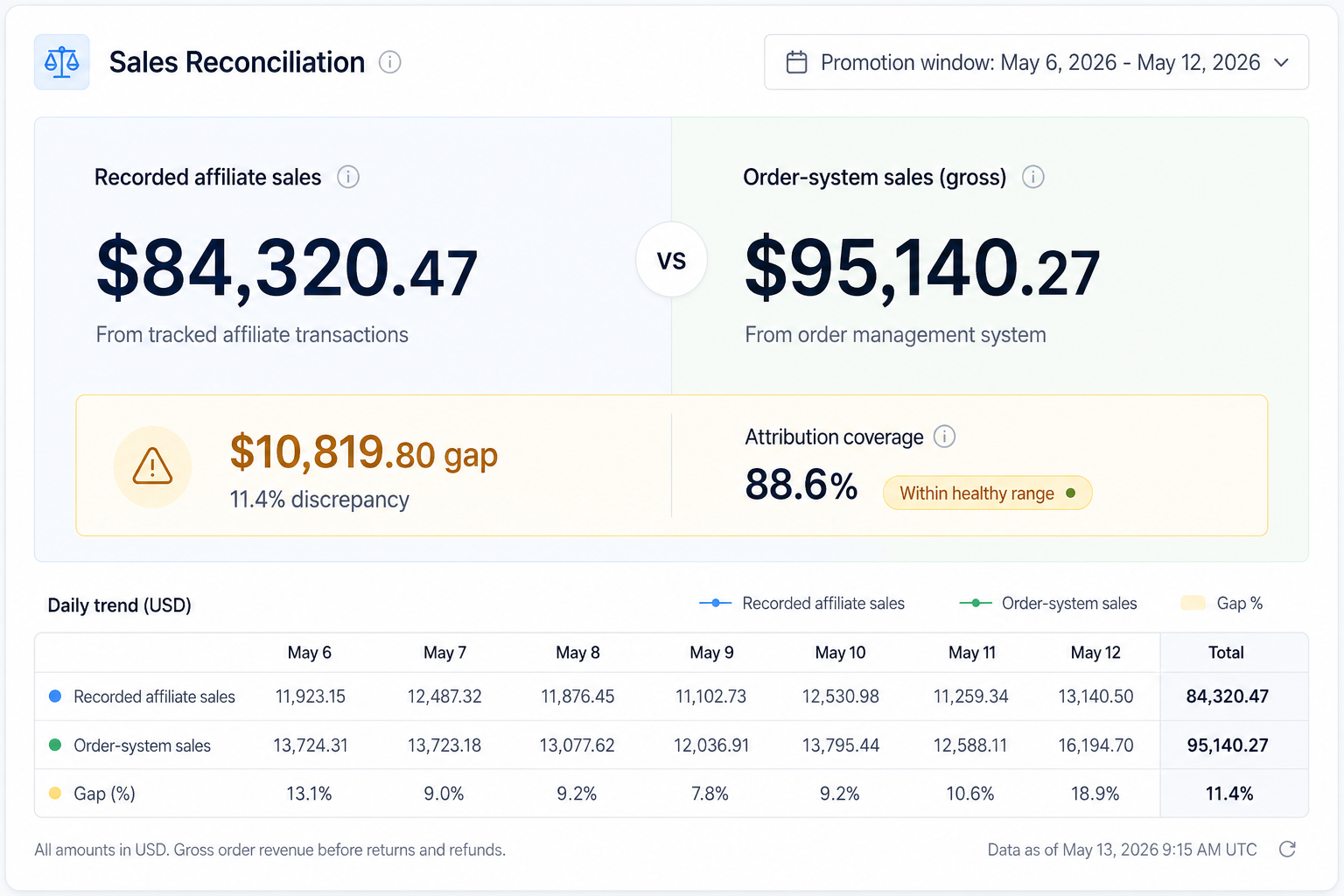 You can spot ad-blocker loss by comparing your order system’s total sales against your affiliate platform’s recorded sales for the same window, then watching whether the gap widens on paid-traffic promotions. A stable 10 to 20% gap is background noise. A gap that jumps to 30% or more during a paid push is blocked tracking.
Pull both numbers for your last three promotions and line them up. If the discrepancy tracks with how much paid or younger-audience traffic each promotion carried, ad blockers are the likely cause, since those groups block at higher rates. What Reports Should Your Affiliate Software Give You? covers which views make this comparison easy to run each month.
The other tell is a formerly strong affiliate whose recorded numbers quietly drop while her audience and effort stay the same. Before you assume she cooled off, check whether her audience skews technical. A privacy-heavy audience blocks more tracking, which drags her recorded conversions down even when her real sales hold steady. Affiliate Program ROI shows how these gaps distort the return math if you don’t account for them.
What to do next
 Three moves, in order.
First, run the discrepancy check above on your last few promotions so you know whether ad blockers are costing you enough to bother fixing. If your gap sits inside 10 to 20% and holds steady, leave it alone and spend your time elsewhere.
Second, if the gap runs wide on paid traffic, add server-side postback tracking so the sale records without the browser, and set up first-party domain tracking so the browser-side events that remain stop matching filter lists. Most platforms that support both make this a settings change, not a rebuild.
Third, if you’re choosing or replacing your platform, put tracking method at the top of your checklist. First-party tracking and server-side recording built into the software beats bolting scripts onto a setup that ad blockers were designed to stop. The sales you recover are ones your partners already earned, and paying them correctly is the fastest way to keep them promoting.